
User Manual


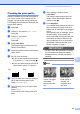


Table Of Contents
- USER’S GUIDE DCP-395CN
- Brother numbers
- Ordering accessories and supplies
- Notice - Disclaimer of Warranties (USA and Canada)
- Compilation and Publication Notice
- Brother® One-Year Limited Warranty and Replacement Service (USA Only)
- BROTHER MULTIFUNCTION CENTER / FAX MACHINE LIMITED WARRANTY (Canada only)
- Table of Contents
- Section I: General
- Section II: Copy
- 4 Making copies
- Section III: Direct Printing
- Section IV: Software
- Section V: Appendixes
- A Safety and Legal
- B Troubleshooting and Routine Maintenance
- C Menu and Features
- D Specifications
- E Glossary
- Index
- brother USA/CAN

90
Cleaning the outside of the
machine B
IMPORTANT
• Use neutral detergents. Cleaning with
volatile liquids such as thinner or benzine
will damage the outside surface of the
machine.
• DO NOT use cleaning materials that
contain ammonia.
• DO NOT use isopropyl alcohol to remove
dirt from the control panel. It may crack the
panel.
Clean the outside of the machine as
follows:
B
a Pull the paper tray (1) completely out of
the machine.
b Wipe the outside of the machine with a
dry, lint-free soft cloth to remove dust.
c Lift the output paper tray cover and
remove anything that is stuck inside the
paper tray.
d Wipe the inside and outside of the paper
tray with a dry, lint-free soft cloth to
remove dust.
e Close the output paper tray cover and
put the paper tray firmly back in the
machine.
1