
Operation Manual

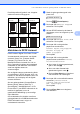


Table Of Contents
- GEBRUIKERSHANDLEIDING DCP-135C DCP-150C DCP-153C DCP-157C
- Samenstelling en publicatie
- EG-conformiteitsverklaring onder de richtlijn R & TTE
- Inhoudsopgave
- Paragraaf I: Algemeen
- Paragraaf II: Kopiëren
- Paragraaf III: Direct Foto's Printen
- 4 Foto's afdrukken vanaf een geheu genkaart of USB-flash-station
- 5 Foto's afdrukken vanaf een camera
- Paragraaf IV: Software
- Paragraaf V: Appendixen
- Index
- brother DUT/BEL-DUT

Hoofdstuk 4
34
PhotoCapture
Center™-
afdrukinstellingen
4
Deze instellingen blijven van kracht totdat u
ze weer wijzigt.
Afdrukkwaliteit 4
a Druk op Menu.
b Druk op a of b om 2.Fotocapture te
selecteren.
Druk op OK.
c Druk op a of b om 1.Printkwaliteit
te selecteren.
Druk op OK.
d Druk op a of b om Norm of Foto te
selecteren.
Druk op OK.
e Druk op Stop/Eindigen.
Papieropties 4
Papiersoort 4
a Druk op Menu.
b Druk op a of b om 2.Fotocapture te
selecteren.
Druk op OK.
c Druk op a of b om 2.Papiersoort te
selecteren.
Druk op OK.
d Druk op a of b om Normaal Papier,
Inkjetpapier, Brother Fotopap.
of Ander fotopapier te selecteren.
Druk op OK.
e Druk op Stop/Eindigen.
Papierformaat 4
a Druk op Menu.
b Druk op a of b om 2.Fotocapture te
selecteren.
Druk op OK.
c Druk op a of b om 3.Papierformaat
te selecteren.
Druk op OK.
d Druk op a of b om het gebruikte
papierformaat te selecteren: Letter,
A4, 10x15cm of 13x18cm.
Druk op OK.
e Druk op Stop/Eindigen.
Afdrukformaat 4
Deze instelling is alleen beschikbaar
wanneer u het papierformaat op Letter of A4
hebt ingesteld.
a Druk op Menu.
b Druk op a of b om 2.Fotocapture te
selecteren.
Druk op OK.
c Druk op a of b om 4.Afm. afdruk te
selecteren.
Druk op OK.
d Druk op a of b om het gebruikte
afdrukformaat te selecteren: 10x8cm,
13x9cm, 15x10cm, 18x13cm,
20x15cm of Max. afmetingen.
Druk op OK.
e Druk op Stop/Eindigen.