Installation Instructions
Manuals
Brands
Brother Manuals
All in One Printer
DCP-117C
24
25
26
27
28
29
30
31
32
33
Table Of Contents
Quick Setup Guide DCP-115C DCP-117C DCP-120C DCP-315CN
Table of Contents
Getting Started
Carton components
Control panel
Step 1 Setting Up the Machine
1 Removing the protective parts
2 Attaching the control panel cover
3 Loading paper
4 Installing the power cord
5 Choosing your language
6 Installing the ink cartridges
7 Print quality check
8 Setting the date and time
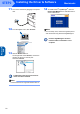
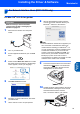
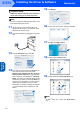
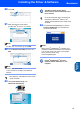
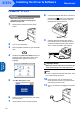
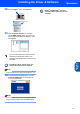
Step 2 Installing the Driver & Software
Supplied CD-ROM ‘MFL-Pro Suite’
Windows®
Macintosh®
Windows®
For USB Interface Users (For Windows® 98/98SE/Me/2000 Professional/XP)
For Network Interface Users (DCP-315CN only) (Windows® 98/98SE/Me/2000 Professional/XP)
Macintosh®
For USB Interface Users
For Mac OS® X 10.2.4 or greater
For Mac OS® 9.1 to 9.2
For Network Interface Users (DCP-315CN only)
For Mac OS® X 10.2.4 or greater
For Mac OS® 9.1 to 9.2
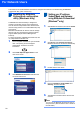
For Network Users
Installing the BRAdmin Professional configuration utility (Windows® only)
Setting your IP address, Subnet Mask and Gateway using BRAdmin Professional (Windows® only)
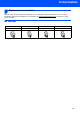
Consumables
Replacement consumables
Ink cartridge
brother UK/IRE
UK/IRE
1
...
...
31
32
33