
Printer User Manual




23
2
2
Operation Panel 2
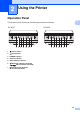
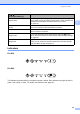
The operation panel consists of the following buttons and indicators.
1 (Power) button
2 (Feed) button
3 POWER indicator
4 STATUS indicator
5 BATT (Battery) indicator
6 (Bluetooth) indicator (RJ-4030)/
(Wi-Fi) indicator (RJ-4040)
7 Bluetooth button (RJ-4030)/
Wi-Fi button (RJ-4040)
Using the Printer 2
1
RJ-4030 RJ-4040
23 4 5 67 1234567