
user manual



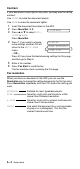
Table Of Contents
- USER’S GUIDE
- Brother numbers
- Ordering accessories and supplies
- Safety precautions
- Choosing a location
- Quick Reference Guide
- Table of Contents
- 1 Introduction
- 2 Paper
- 3 On-Screen Programming
- 4 Initial Setup
- Getting started
- Setting the Date and Time
- Turning on Automatic Daylight Savings Time
- Setting the Station ID
- Setting the Beeper Volume
- Setting the Speaker Volume
- Choosing the Handset Volume (For Volume Amplify)
- Setting Volume Amplify
- Setting the Ring Volume
- Setting Tone and Pulse dialing mode (Canada Only)
- Setting up your area code (USA only)
- Getting started
- 5 Setup Receive
- 6 Setup Send
- 7 Quick-Dial numbers and dialing options
- 8 Remote Fax Options
- 9 Printing reports
- 10 Making copies
- 11 Important information
- 12 Troubleshooting and routine maintenance
- Glossary
- Specifications
- Index
- Remote Retrieval Access Card

6 - 4
Setup Send
Contrast
If your document is very light or very dark, you may want to set the
contrast.
Use LIGHT to make the document darker.
Use DARK to make the document lighter.
1
Insert the document face down in the ADF.
2
Press Menu/Set, 3, 3.
3
Press ▲ or ▼ to select AUTO,
LIGHT or DARK.
Press Menu/Set.
4
Press 1 if you want to choose
more settings and the LCD will
return to the SETUP SEND
menu.
—OR—
Press 2 if you have finished choosing settings for this page,
and then go to Step 5.
5
Enter a fax number.
6
Press Fax Start to send the fax.
The fax machine starts scanning the first page.
Fax resolution
When you have an document in the ADF you can use the
Resolution key to change the setting temporarily (for this fax only).
Press Resolution repeatedly until the LCD shows the setting you
want.
STANDARD Suitable for most typed documents.
FINE Good for small print and transmits a little
slower than Standard resolution.
S.FINE Good for small print or artwork and transmits
slower than Fine resolution.
PHOTO Use when the document has varying shades
of gray or is a photograph. This has the
slowest transmission time.
3.CONTRAST
ACCEPTED
OTHER SETTINGS?
1.YES 2.NO