
user manual

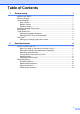
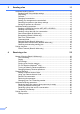
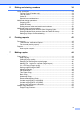

Table Of Contents
- Advanced User’s Guide MFC-J4510DW MFC-J4710DW
- User's Guides and where do I find them?
- Table of Contents
- 1 General setup
- 2 Security features
- 3 Sending a fax
- Additional sending options
- Additional sending operations
- Sending a 2-sided fax from the ADF (MFC-J4710DW)
- Sending a fax manually
- Sending a fax at the end of a conversation
- Dual Access (Black & White only)
- Broadcasting (Black & White only)
- Real Time Transmission
- Overseas Mode
- Delayed Faxing (Black & White only)
- Delayed Batch Transmission (Black & White only)
- Checking and canceling waiting jobs
- Polling overview
- 4 Receiving a fax
- 5 Dialing and storing numbers
- 6 Printing reports
- 7 Making copies
- Copy options
- Stop copying
- Changing copy quality
- Enlarging or reducing the copied image
- Making N in 1 copies or a poster (Page Layout)
- 2 in 1 ID Copy (Page Layout)
- Sorting copies using the ADF
- Adjusting Density
- Ink Save Mode
- Thin Paper Copy
- Book Copy
- Watermark Copy
- Remove Background Color
- 2-sided copying (MFC-J4510DW)
- 2-sided copying (MFC-J4710DW)
- Saving copy options as a Shortcut
- Ledger Copy Shortcuts
- Copy options
- 8 PhotoCapture Center™: Printing photos from a memory card or USB Flash memory drive
- 9 Printing photos from a camera
- A Routine maintenance
- B Glossary
- Index
- brother USA/CAN

v
8 PhotoCapture Center™: Printing photos from a memory card or
USB Flash memory drive 58
PhotoCapture Center™ operations .....................................................................58
Memory cards, USB Flash memory drive and folder structures ....................58
Movie printing ................................................................................................59
Print Images.........................................................................................................59
Print Index (Thumbnails) ...............................................................................59
Printing Photos ..............................................................................................60
Enhance Photos ............................................................................................60
Slide Show..................................................................................................... 62
DPOF printing ................................................................................................63
PhotoCapture Center™ print settings.................................................................. 64
Print Quality ...................................................................................................64
Paper options ................................................................................................64
Adjusting Brightness, Contrast and Color......................................................66
Cropping ........................................................................................................68
Borderless printing.........................................................................................68
Print Date.......................................................................................................69
Setting your changes as the new default.......................................................69
Restoring all settings to the factory settings ..................................................70
Scan to a memory card or USB Flash memory drive ..........................................70
Auto Crop ......................................................................................................70
How to set a new default ...............................................................................72
How to reset to the factory settings ...............................................................72
Saving scan options as a Shortcut ................................................................73
9 Printing photos from a camera 74
Printing photos directly from a PictBridge camera...............................................74
PictBridge requirements ................................................................................74
Setting your digital camera ............................................................................ 74
Printing Images..............................................................................................75
DPOF printing ................................................................................................76
Printing photos directly from a digital camera (without PictBridge)......................76
Printing Images..............................................................................................77
A Routine maintenance 78
Cleaning and checking the machine....................................................................78
Cleaning the outside of the machine .............................................................78
Cleaning the machine’s printer platen ........................................................... 79
Cleaning the paper feed rollers .....................................................................80
Cleaning the paper pick-up rollers .................................................................81
Cleaning the paper pick-up rollers for paper tray #2 (MFC-J4710DW) .........82
Checking the ink volume ...............................................................................82
Packing and shipping the machine ......................................................................83
B Glossary 85
C Index 89