
user manual
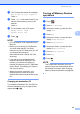
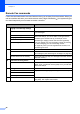
Table Of Contents
- Advanced User’s Guide MFC-J4510DW MFC-J4710DW
- User's Guides and where do I find them?
- Table of Contents
- 1 General setup
- 2 Security features
- 3 Sending a fax
- Additional sending options
- Additional sending operations
- Sending a 2-sided fax from the ADF (MFC-J4710DW)
- Sending a fax manually
- Sending a fax at the end of a conversation
- Dual Access (Black & White only)
- Broadcasting (Black & White only)
- Real Time Transmission
- Overseas Mode
- Delayed Faxing (Black & White only)
- Delayed Batch Transmission (Black & White only)
- Checking and canceling waiting jobs
- Polling overview
- 4 Receiving a fax
- 5 Dialing and storing numbers
- 6 Printing reports
- 7 Making copies
- Copy options
- Stop copying
- Changing copy quality
- Enlarging or reducing the copied image
- Making N in 1 copies or a poster (Page Layout)
- 2 in 1 ID Copy (Page Layout)
- Sorting copies using the ADF
- Adjusting Density
- Ink Save Mode
- Thin Paper Copy
- Book Copy
- Watermark Copy
- Remove Background Color
- 2-sided copying (MFC-J4510DW)
- 2-sided copying (MFC-J4710DW)
- Saving copy options as a Shortcut
- Ledger Copy Shortcuts
- Copy options
- 8 PhotoCapture Center™: Printing photos from a memory card or USB Flash memory drive
- 9 Printing photos from a camera
- A Routine maintenance
- B Glossary
- Index
- brother USA/CAN

Chapter 4
28
Remote Fax commands 4
Follow the commands below to access features when you are away from the machine. When you
call the machine and enter your remote access code (3 digits followed by ), the system will give
two short beeps and you must enter a remote command.
Remote commands Operation details
95 Change the Fax Forwarding,
Paging or Fax Storage settings
1 OFF You can choose Off after you have retrieved or erased all
your messages.
2 Fax Forwarding One long beep means the change is accepted. If you hear
three short beeps, you cannot make a change because
something has not been set up (for example, a Fax
Forwarding or Paging number has not been registered).
You can register your Fax Forwarding number by entering
4. (See Changing your Fax Forwarding number
on page 29.) Once you have registered the number, Fax
Forwarding will work.
3 Paging
4 Fax Forwarding number
6 Fax Storage
96 Retrieve a fax
2 Retrieve all faxes Enter the number of a remote fax machine to receive stored
fax messages. (See Retrieving fax messages on page 29.)
3 Erase faxes from the memory If you hear one long beep, fax messages have been erased
from the memory.
97 Check the receiving status
1 Fax You can check whether your machine has received any
faxes. If yes, you will hear one long beep. If no, you will hear
three short beeps.
98 Change the Receive Mode
1 External TAD If you hear one long beep, your change has been accepted.
2 Fax/Tel
3 Fax Only
90 Exit Pressing 9 0 allows you to exit remote retrieval. Wait for the
long beep, then replace the handset.