
user manual

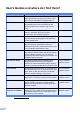
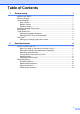
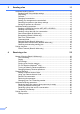
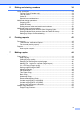

Table Of Contents
- Advanced User’s Guide MFC-J4510DW MFC-J4710DW
- User's Guides and where do I find them?
- Table of Contents
- 1 General setup
- 2 Security features
- 3 Sending a fax
- Additional sending options
- Additional sending operations
- Sending a 2-sided fax from the ADF (MFC-J4710DW)
- Sending a fax manually
- Sending a fax at the end of a conversation
- Dual Access (Black & White only)
- Broadcasting (Black & White only)
- Real Time Transmission
- Overseas Mode
- Delayed Faxing (Black & White only)
- Delayed Batch Transmission (Black & White only)
- Checking and canceling waiting jobs
- Polling overview
- 4 Receiving a fax
- 5 Dialing and storing numbers
- 6 Printing reports
- 7 Making copies
- Copy options
- Stop copying
- Changing copy quality
- Enlarging or reducing the copied image
- Making N in 1 copies or a poster (Page Layout)
- 2 in 1 ID Copy (Page Layout)
- Sorting copies using the ADF
- Adjusting Density
- Ink Save Mode
- Thin Paper Copy
- Book Copy
- Watermark Copy
- Remove Background Color
- 2-sided copying (MFC-J4510DW)
- 2-sided copying (MFC-J4710DW)
- Saving copy options as a Shortcut
- Ledger Copy Shortcuts
- Copy options
- 8 PhotoCapture Center™: Printing photos from a memory card or USB Flash memory drive
- 9 Printing photos from a camera
- A Routine maintenance
- B Glossary
- Index
- brother USA/CAN

i
User's Guides and where do I find them?
1
Visit us at http://solutions.brother.com/.
Which Guide? What's in it? Where is it?
Product Safety Guide Read this Guide first. Please read the Safety
Instructions before you set up your machine. See
this Guide for trademarks and legal limitations.
Printed / In the box
Quick Setup Guide Follow the instructions for setting up your machine
and installing the drivers and software for the
operating system and connection type you are
using.
Printed / In the box
Basic User’s Guide Learn the basic Fax, Copy, Scan and PhotoCapture
Center™ operations and how to replace
consumables. See troubleshooting tips.
Printed / In the box
Advanced User’s Guide Learn more advanced operations: Fax, Copy,
security features, printing reports and performing
routine maintenance.
PDF file / CD-ROM
Software User’s Guide Follow these instructions for Printing, Scanning,
Network Scanning, PhotoCapture Center™,
Remote Setup, PC-Fax, Web Services (Scan), and
using the Brother ControlCenter utility.
PDF file / CD-ROM
Network User’s Guide This Guide provides useful information about wired
and wireless network settings and security settings
using the Brother machine. You can also find
supported protocol information for your machine and
detailed troubleshooting tips.
PDF file / CD-ROM
Web Connect Guide This Guide provides useful information about
accessing Internet services from the Brother
machine, as well as downloading images, printing
data and uploading files directly to Internet services.
PDF file / Brother
Solutions Center
1
AirPrint Guide This Guide provides information for using AirPrint to
print from Mac OS X v10.7.x and your iPhone, iPod
touch, iPad, or other iOS device to your Brother
machine without installing a printer driver.
PDF file / Brother
Solutions Center
1
Google Cloud Print Guide
This Guide provides details on how to use Google
Cloud Print™ services for printing over the Internet.
PDF file / Brother
Solutions Center
1
Wi-Fi Direct™ Guide This Guide provides details on how to configure and
use your Brother machine for wireless printing
directly from a mobile device supporting the Wi-Fi
Direct™ standard.
PDF file / Brother
Solutions Center
1
Mobile Print/Scan Guide
for Brother iPrint&Scan
This Guide provides useful information about
printing from your mobile device and scanning from
your Brother machine to your mobile device when
connected to a Wi-Fi network.
PDF file / Brother
Solutions Center
1