
user manual
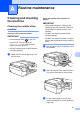
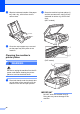
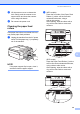
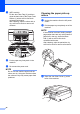
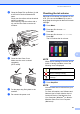
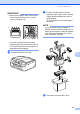
Table Of Contents
- Advanced User’s Guide MFC-J450DW MFC-J470DW MFC-J475DW DCP-J152W
- User's Guides and where do I find them?
- Table of Contents
- 1 General setup
- 2 Security features (MFC models)
- 3 Sending a fax (MFC models)
- 4 Receiving a fax (MFC models)
- 5 Dialing and storing numbers (MFC models)
- 6 Printing reports
- 7 Making copies
- Copy options
- Stop copying
- Improving copy quality
- Enlarging or reducing copies
- Making N in 1 copies or a poster (Page Layout)
- 2 in 1 ID copy (Page Layout)
- Sorting copies
- Adjusting Density
- Remove Background Color
- 2-sided copying (MFC models)
- Setting your changes as the new default
- Restoring all settings to the factory settings
- Copy options
- A Routine maintenance
- B Glossary
- Index
- brother USA/CAN

38
d Wipe the inside and outside of the paper
tray with a dry, soft lint-free cloth to
remove dust.
e Close the output paper tray cover and
put the paper tray firmly back in the
machine.
Cleaning the machine’s
printer platen A
WARNING
Be sure to unplug the machine from the AC
power outlet before cleaning the printer
platen to avoid an electrical shock.
a Place both hands under the plastic tabs
on both sides of the machine to lift the
scanner cover into the open position.
b Clean the machine’s printer platen (1)
and the area around it, wiping off any
scattered ink with a dry, soft lint-free
cloth.
(MFC models)
(DCP model)
IMPORTANT
DO NOT touch the encoder strip (2).
Doing this may cause damage to the
machine.
2
1
1
2