
user manual
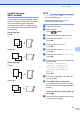
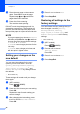
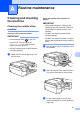
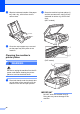
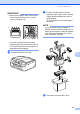
Table Of Contents
- Advanced User’s Guide MFC-J450DW MFC-J470DW MFC-J475DW DCP-J152W
- User's Guides and where do I find them?
- Table of Contents
- 1 General setup
- 2 Security features (MFC models)
- 3 Sending a fax (MFC models)
- 4 Receiving a fax (MFC models)
- 5 Dialing and storing numbers (MFC models)
- 6 Printing reports
- 7 Making copies
- Copy options
- Stop copying
- Improving copy quality
- Enlarging or reducing copies
- Making N in 1 copies or a poster (Page Layout)
- 2 in 1 ID copy (Page Layout)
- Sorting copies
- Adjusting Density
- Remove Background Color
- 2-sided copying (MFC models)
- Setting your changes as the new default
- Restoring all settings to the factory settings
- Copy options
- A Routine maintenance
- B Glossary
- Index
- brother USA/CAN

Making copies
35
7
2-sided copying
(MFC models) 7
You can reduce the amount of paper used for
copies by copying on both sides of the paper.
We recommend you load single-sided
documents in the ADF for 2-sided copying.
For 2-sided documents and books, use the
scanner glass.
(Long edge flip)
Portrait
Landscape
(Short edge flip)
Portrait
Landscape
NOTE
• 2in1(ID), Poster and Fit to Page
are not available with 2-sided Copy.
• You can use only Letter, A4, A5 or
Executive size plain paper.
a Load your document.
b (MFC models)
Press (COPY).
c Enter the number of copies you want.
d Press a or b to choose Stack/Sort.
Press OK.
e Press a or b to choose Sort.
Press OK.
f Press a or b to choose 2-sided Copy.
Press OK.
g Press a or b to choose 2-sided Copy.
Press OK.
h Press a or b to choose the 2-sided copy
type you want
Portrait LongEdgeFlip,
Landscape LongEdgeFlip,
Portrait ShortEdgeFlip,
Landscape ShortEdgeFlip
(or Off).
Press OK.
i Review your settings on the LCD, and
then press OK.
j Press Black Start or Color Start.
If you placed the document in the ADF,
the machine scans the pages and starts
printing.
If you are using the scanner glass, go
to step k.
k After the machine scans the page, press
1 to scan the next page.
1
2
1
1
2
1
1
2
1
2
1
2
1
1
2
1
1
2
1
2