
user manual
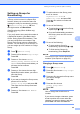
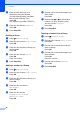
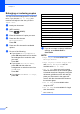
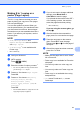
Table Of Contents
- Advanced User’s Guide MFC-J450DW MFC-J470DW MFC-J475DW DCP-J152W
- User's Guides and where do I find them?
- Table of Contents
- 1 General setup
- 2 Security features (MFC models)
- 3 Sending a fax (MFC models)
- 4 Receiving a fax (MFC models)
- 5 Dialing and storing numbers (MFC models)
- 6 Printing reports
- 7 Making copies
- Copy options
- Stop copying
- Improving copy quality
- Enlarging or reducing copies
- Making N in 1 copies or a poster (Page Layout)
- 2 in 1 ID copy (Page Layout)
- Sorting copies
- Adjusting Density
- Remove Background Color
- 2-sided copying (MFC models)
- Setting your changes as the new default
- Restoring all settings to the factory settings
- Copy options
- A Routine maintenance
- B Glossary
- Index
- brother USA/CAN

Chapter 7
30
Enlarging or reducing copies 7
You can choose an enlargement or reduction
ratio. If you choose Fit to Page, your
machine will adjust to the size you set in
Paper Size.
a Load your document.
b (MFC models)
Press (COPY).
c Enter the number of copies you want.
d Press a or b to choose
Enlarge/Reduce.
Press OK.
e Press a or b to choose the available
options.
f Do one of the following:
If you chose Enlarge or Reduce,
press OK and press a or b to choose
the enlargement or reduction ratio
you want.
Press OK.
If you chose Custom(25-400%),
press OK and then enter an
enlargement or reduction ratio from
25% to 400%.
Press OK.
If you chose 100% or Fit to Page,
press OK.
g If you do not want to change additional
settings, press Black Start or
Color Start.
NOTE
• Page Layout is not available with
Enlarge/Reduce.
• Page Layout, 2-sided Copy
1
, Sort
and Remove Background are not
available with Fit to Page.
• Fit to Page does not work correctly
when the document on the scanner glass
is skewed more than 3 degrees. Using the
document guidelines on the left and top,
place your document in the upper-left
corner, with the document face down on
the scanner glass.
• Fit to Page is not available when
using the ADF
1
.
• Fit to Page is not available for Legal
size documents.
1
MFC models only
198% 4"x6"iA4
186% 4"x6"iLTR
104% EXEiLTR
100%
97% LTRiA4
93% A4iLTR
85% LTRiEXE
83% (DCP model)
83% LGLiA4 (MFC models)
78% (DCP model)
78% LGLiLTR (MFC models)
46% LTRi4"x6"
Fit to Page
Custom(25-400%)