
user manual
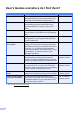
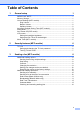
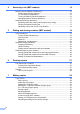

Table Of Contents
- Advanced User’s Guide MFC-J450DW MFC-J470DW MFC-J475DW DCP-J152W
- User's Guides and where do I find them?
- Table of Contents
- 1 General setup
- 2 Security features (MFC models)
- 3 Sending a fax (MFC models)
- 4 Receiving a fax (MFC models)
- 5 Dialing and storing numbers (MFC models)
- 6 Printing reports
- 7 Making copies
- Copy options
- Stop copying
- Improving copy quality
- Enlarging or reducing copies
- Making N in 1 copies or a poster (Page Layout)
- 2 in 1 ID copy (Page Layout)
- Sorting copies
- Adjusting Density
- Remove Background Color
- 2-sided copying (MFC models)
- Setting your changes as the new default
- Restoring all settings to the factory settings
- Copy options
- A Routine maintenance
- B Glossary
- Index
- brother USA/CAN

ii
Table of Contents
1 General setup 1
IMPORTANT NOTE...............................................................................................1
Memory Storage ....................................................................................................1
Volume Settings (MFC models).............................................................................1
Ring Volume ....................................................................................................1
Beeper Volume................................................................................................2
Speaker Volume ..............................................................................................2
Automatic Daylight Saving Time (MFC models)....................................................3
Sleep Mode ........................................................................................................... 3
Auto Power Off (DCP model).................................................................................4
LCD screen............................................................................................................4
Setting the backlight brightness.......................................................................4
Setting the Dim Timer for the backlight ...........................................................4
Mode Timer (MFC models)....................................................................................5
2 Security features (MFC models) 6
TX Lock .................................................................................................................6
Setting and changing the TX Lock password ..................................................6
Turning TX Lock on/off .................................................................................... 7
3 Sending a fax (MFC models) 8
Additional sending options.....................................................................................8
Sending faxes using multiple settings .............................................................8
Stop faxing.......................................................................................................8
Contrast ...........................................................................................................8
Changing fax resolution...................................................................................9
Setting your changes as the new default.......................................................10
Restoring fax options to the factory settings.................................................. 10
Additional sending operations.............................................................................. 10
Sending a fax manually .................................................................................10
Sending a fax at the end of a conversation ...................................................10
Dual Access (Black & White only) .................................................................11
Broadcasting (Black & White only) ................................................................11
Real Time Transmission................................................................................ 13
Overseas Mode .............................................................................................13
Checking and canceling waiting jobs............................................................. 14