
Home Theater Server User Manual
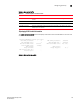
Table Of Contents
- Contents
- About This Document
- Network Security
- TCP SYN attacks
- IP TCP syn-proxy
- Granular application of syn-proxy feature
- Syn-def
- No response to non-SYN first packet of a TCP flow
- Prioritizing management traffic
- Peak BP utilization with TRAP
- Transaction Rate Limit (TRL)
- Understanding transaction rate limit
- Configuring transaction rate limit
- Configuring the maximum number of rules
- Saving a TRL configuration
- Transaction rate limit command reference
- Global TRL
- TRL plus security ACL-ID
- security acl-id
- Transaction rate limit hold-down value
- Displaying TRL rules statistics
- Displaying TRL rules in a policy
- Displaying IP address with held down traffic
- Refusing new connections from a specified IP address
- HTTP TRL
- Overview of HTTP TRL
- Configuring HTTP TRL
- Displaying HTTP TRL
- Display all HTTP TRL policies
- Display HTTP TRL policy from index
- Display HTTP TRL policy client
- Display HTTP TRL policy starting from index
- Display HTTP TRL policy matching a regular expression
- Display HTTP TRL policy client index (MP)
- Display HTTP TRL policy client index (BP)
- Display HTTP TRL policy for all client entries (BP)
- Downloading an HTTP TRL policy through TFTP
- HTTP TRL policy commands
- Logging for DoS Attacks
- Maximum connections
- clear statistics dos-attack
- Maximum concurrent connection limit per client
- Firewall load balancing enhancements
- Syn-cookie threshhold trap
- Service port attack protection in hardware
- Traffic segmentation
- DNS attack protection
- Access Control List
- How ServerIron processes ACLs
- Default ACL action
- Types of IP ACLs
- ACL IDs and entries
- ACL entries and the Layer 4 CAM
- Configuring numbered and named ACLs
- Modifying ACLs
- Displaying a list of ACL entries
- Applying an ACLs to interfaces
- ACL logging
- Dropping all fragments that exactly match a flow-based ACL
- Enabling ACL filtering of fragmented packets
- Enabling hardware filtering for packets denied by flow-based ACLs
- Enabling strict TCP or UDP mode for flow-based ACLs
- ACLs and ICMP
- Using ACLs and NAT on the same interface (flow-based ACLs)
- Displaying ACL bindings
- Troubleshooting rule-based ACLs
- IPv6 Access Control Lists
- Network Address Translation
- Syn-Proxy and DoS Protection
- Understanding Syn-Proxy
- Configuring Syn-Proxy
- DDoS protection
- Configuring a security filter
- Configuring a Generic Rule
- Configuring a rule for common attack types
- Configuring a rule for ip-option attack types
- Configuring a rule for icmp-type options
- Configuring a rule for IPv6 ICMP types
- Configuring a rule for IPv6 ext header types
- Binding the filter to an interface
- Clearing DOS attack statistics
- Clearing all DDOS Filter & Attack Counters
- Logging for DoS attacks
- Displaying security filter statistics
- Address-sweep and port-scan logging
- Secure Socket Layer (SSL) Acceleration
- SSL overview
- SSL acceleration on the ServerIron ADX
- Configuring SSL on a ServerIron ADX
- Basic SSL profile configuration
- Advanced SSL profile configuration
- Configuring Real and Virtual Servers for SSL Termination and Proxy Mode
- Configuration Examples for SSL Termination and Proxy Modes
- SSL debug and troubleshooting commands
- Displaying socket information

120 ServerIron ADX Security Guide
53-1002440-03
Configuring Syn-Proxy
5
Configuring Syn-Proxy auto control
Syn-proxy auto control operates the same as the normal Syn-proxy feature except that it is enabled
and disabled based-on the arrival rate of TCP SYN packets on the ServerIron ADX. This is described
in “Syn-Proxy auto control” on page 113. The following steps describe how to configure your
ServerIron ADX for Syn-proxy auto control.
1. Set the SYN-Proxy auto control threshold levels – This procedure described in “Setting the
SYN-Proxy auto control thresholds” on page 120, sets the thresholds for enabling and
disabling Syn-Proxy during operation of the ServerIron ADX.
2. Set the interval time for counting TCP SYN packets – This procedure described in “Setting the
interval time for counting TCP SYN packets” on page 121, sets the time period over which the
thresholds set in Step 1 are evaluated.
3. Define Syn-Proxy on an in-bound interface – This is described in Step 2 of the procedure for
“Enabling SYN-Proxy” on page 114.
Considerations for configuring Syn-proxy auto control
The following details concerning operation of the Syn-proxy feature should be considered when
configuring the Syn-proxy auto control feature on a ServerIron ADX:
• All traffic including SLB and pass-through traffic is brought to a BP. Consequently, regardless of
whether or not an interface has the syn-proxy feature enabled, if the threshold set for the rate
of syns received per-second is exceeded for all ports on a ServerIron ADX, Syn-proxy auto
control is enabled and will stay enabled as long as the rate remains above the configured
off-threshold value.
• For interfaces that do not have the syn-proxy feature enabled, there will not be any syn attack
protection even when Syn-proxy is enabled through auto control. Consequently, for the
Syn-proxy auto control feature to work as expected, we recommend that syn-proxy be enabled
on all interfaces.
Setting the SYN-Proxy auto control thresholds
To activate Syn-Proxy auto control, follow these steps:
Globally enable Syn-Proxy auto control by setting the thresholds for enabling and disabling
Syn-Proxy as shown in the following command.
ServerIronADX(config)# ip tcp syn-proxy on-threshold 1000 off-threshold 500
Syntax: ip tcp syn-proxy on-threshold <on-threshold-value> off-threshold <off-threshold-value>
The on-threshold parameter is used to define the rate of syns received per-second (specified by the
<on-threshold-value> variable) at which the Syn-Proxy feature is enabled on the ServerIron ADX.
IPv6 64, 236, 516, 946, 1004, 1420, 1432, 1440
IPv4 Jumbo 256, 536, 966, 1024, 1452, 1460, 4038, 8960
TABLE 9 MSS values for IPv4, IPv6 and IPv4 jumbo
MSS value