
Technical data



ServerIron ADX Graphical User Interface Guide 117
53-1002412-01
Access Control Lists
8
3. Click New IPv4 Extended ACL at the bottom of the ACL Summary page.
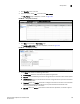
The ACL IPv4 Extended - new page is displayed, as shown in Figure 99.
FIGURE 99 Configuring extended ACL
4. Provide the following information:
• ACL ID / Name: Select one of the following options:
ID#: Enter the number to identify a collection of individual ACL entries. The range is
from 100 through 199. By default, ACL ID is enabled.
Name: Enter the name of the ACL.
• Action: Click one of the following options:
Permit—Permits the packets that matches the ACL policy.
Deny—Denies the packets that matches the ACL policy.
• Log: Select the check box to generate a system log entry for packets that are denied by the
ACL entry. This option is enabled when you choose Deny action.
• Protocol Match: Select a protocol in the list to provide the type of IP packet you are
filtering.
• Match established connections: Select the check box to enable the policy only to the
established TCP connections, and not to new sessions.
• Remark: Enter the remark.
5. Under Source, provide the following information:
• Click Source IP or Source Host.
• Any: Select the check box for ACL to use any source IP or host.
• Source IP: Enter the source IP address based on which a standard ACL permits or denies
the packets.
NOTE
The Source IP field is enabled if you select the Source IP option.
• Source Host: Enter the name of the source host.
NOTE
The Source Host field is enabled if you select the Source Host option.