
Operation Manual




Page 29
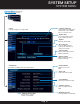
DEVICE MENU
• Channel
Select the channel that
has a PTZ camera
• Protocol
Select operating code for
PTZ camera
• Left Right Swap
Mirror joystick left/right
movement
• Width of Monitor
Adjust display
horizontal aspect
• Height of Monitor
Adjust display vertical aspect
• Address
Address of the PTZ
camera
• BR
Baud rate
• Iris Zoom Swap
Mirror zoom motion on
joystick
• Device ID
For use with multiple DVRs,
select a simple number ID for
the DVR. NOTE: This can be
between 0 and 255
• Up Down Swap
Mirror joystick up/down
movement
• Focus Zoom Swap
Mirror focus zoom motion
on joystick
• Zoom Swap
Mirror zoom motion on
joystick
• Preset
Select and adjust preset
for PTZ camera
• Patrol
Select and adjust patrol
preset for PTZ camera
System Menu (Continued)
Path: System Setup>System
SYSTEM SETUP