
Operation Manual




Page 25
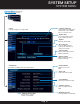
• Inbound Setting
Select settings for DVR to
receive email
• Inbound Site
Enter the site for the inbound
mailbox
• Modify
Adjust Inbound email settings
• Add/Delete
Add or Delete Inbound email
settings
• SMTP
Simple Mail Transfer
Protocol settings for
the outbound email
address
• User Name
Username/
address of
outbound email
• Password
Password of
outbound email
• Interval
How often to send email
in alarm state
• E-Mail
Adjust settings for E-Mail alarms, and destination
email address and settings
• Mail Testing
Click to send a
test email and
confirm settings are
working
This symbol means
channel is recording.
Indicates motion detect is enabled.
Indicates motion detected.
COM
NO
NC
ALARM
COMCOMOUT 34 2 1
From NO or NC depending on setup
selected to alarm inputs 1 through 4
Use COM from
alarm block
to Switch COM
Example Device:
Door Sensor
Note: Switch COM must be connected to COM in alarm block for device to operate properly
Alarm Menu (Continued)
Path: System Setup>Alarm
SYSTEM SETUP
ALARM MENU