
Installation guide




34
Maintenance
Air Filiter
Replacing the air filter
When the used time reaches the filter counter
time,the projector will display message such
as” Filter Replace.Filter has been used more
than 100 hours.”
If the filter is difficult to clean or if it is
deteriorating,
also ask the dealer to
replace the filter.
1.Turn the projector off, and unplug
the powercord. Allow the projector
to sufficiently cool down.
2.
Remove the filter cover from
the right of projector.
3.
Pull out the air filter.
4.
Install the new air filter.
5.
And then put the filter cover
back on.
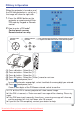
6.
After please select the
Reset filter timer item of the
Security menu and display a
dialog.
NOTE
►If the internal temperature become too high because of filter blocked, the
projector may turn off itself to prevent the internal heat level rising.
WARNING
►
Use only the air filter of the specified type. Do not use the projector without the
air filter or the filter cover. It could result in a fire or malfunction to the projector.
Screw
Iron net
filter cover
air filter
Please check and clean the air filter periodically. When the dialog have warning
message prompts you to clean the air filter, comply with it as soon as possible.
Replace the air filter when it is damaged or too soiled.
2
4
6
3
Up
Reset Filter Timer?
Select “No” to exit.
Lamp Reset Yes
No
5
Downloaded From projector-manual.com Boxlight Manuals