
Installation guide



13
Remote control
Using as a simple PC mouse & keyboard
The enclosed remote control works as a
simple mouse and keyboard of the PC,
when the projector's USB port connects
with the PC's mouse port via a mouse
cable.(SEE P4)
CAUTION ►Improper use of the simple mouse & keyboard function could
damage your equipment. While using this function, please connect this
product only to a PC.
About the remote control signal
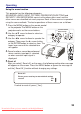
1.The remote control works with the
projector’s remote sensor. This
projector have 2 remote sensors
on the front and back.
2.The sensor senses the signal within
the following range when the sensor
is active:30 degrees (15 degrees to
the left and right of the sensor) within
7 meters about.
NOTE ► Laser pointer of the remote control is used in place of a finger or rod.
Never look directly into the laser beam outlet or point the laser beam at other people.
15
0
15
0
remote sensor
Downloaded From projector-manual.com Boxlight Manuals