
Specifications





Setup 26
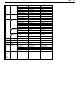
Quick: F1
F1
Quick
F2
Genrl
F3
Disp
F4
Kybd
F5
Keys
F6
Ports
F7
Host
F8
Print
F9
Emul
F10
Tabs
F11
AnsBk
F12
Prog
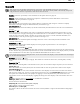
Print
Exec
Parameters
Emulation=IBM 3151 EIA Baud Rate=9600 EIA Data Format=8/1/N
Enhance=On Aux Baud Rate=9600 Aux Data Format=8/1/N
Comm Mode=Full Duplex Language=U.S. Sessions=One
Host/Printer=EIA/Para
Choices
ADDS VP Wyse 60 Wyse 50+ PC Term VT300/7 VT300/8 VT200/7
VT200/8 VT100 SCO Console IBM 3151 TVI 925 AT386
Select
↑ → ↓ ← : Parameter
Enter/S-Enter : Next/Prev Choice Exit : Setup Key
Emulation: [ADDS VP, Wyse 60, Wyse 50+, PC Term, VT300/8, VT300/7, VT200/8, VT200/7, VT100, IBM 3151, SCO Console, AT386,
TVI 925]
Select the “personality” of the terminal (the way in which it responds to commands). Note that SCO Console and
AT
386 emulations are not available with the ANSI keyboard. If you are using PC-Term emulation, refer to Local
Leadin selection in the Keys: F5 section for access to local “hot keys.”
Wyse-325, Wyse-350, and Intercolor emulations available only in 260lfc.
All associated defaults are loaded when the emulation is changed. Default choices are in bold. Some defaults
may vary depending on the selected emulation.
Comm Mode: [Full Duplex, Half Duplex, Full Block, Half Block]
Select the method of communication to match the host computer.
EIA Baud Rate: [13400, 115,200, 76800, 57,600, 38400, 19200, 9600, 4800, 2400, 2000, 1800, 1200, 600, 300, 150, 110]
Select the number of bits communicated per second to match the speed at which the primary host, printer or
othe
r device expects to communicate.
AUX Baud Rate: [3840
0, 19200, 9600, 4800, 2400, 2000, 1800, 1200, 600, 300, 150, 134.5, 110]
Speed at which the secondary host, printer, or other device expects to communicate.
Enhanced: [On, Off]
Normally, the terminal responds to a set of commands that correspond to the emulation selected. When
Enhance
d mode is on, the set of commands is extended to those printed in boldface in the 260xx Programmer’s
Reference Guide.
EIA Data Format: [
7/1/N, 7/1/O, 7/1/E, 7/1/M, 7/1/S, 7/2/N, 7/2/O, 7/2/E, 7/2/M, 7/2/S, 8/1/N, 8/1/O, 8/1/E, 8/1/M, 8/2/N, 8/2/O, 8/2/E]
Select a data bits/stop bits/parity combination which matches the data format of the primary host, printer or
othe
r device. Parity abbreviations are: O = odd, E = even, S = space, M = mark, and N = none.
AUX Data Format:
[7/1/O, 7/1/E, 7/1/M, 7/1/S, 7/2/N, 7/2/O, 7/2/E, 7/2/M, 7/2/S, 8/1/N, 8/1/O, 8/1/E, 8/1/M, 8/1/S, 8/2/N]
Select a data bits/parity bits/stop combination which matches the data format of the secondary host, printer or
othe
r device. Parity abbreviations are: O = odd, E = even, S = space, M = mark, and N = none.
Language: [U.S., U.K., Danish, Finnish, French, German, Norwegian, Portuguese, Span
ish, Swedish, Dutch, Belgian-Flemish, French-Canadian,
Italian, Latin American, Swiss-French, Swiss-German]
Select the language type which matches your keyboard’s layout.
Sessions: [One, Two]
Select the number of sessions that the terminal will run. One session is required per connection to a host. When
two se
ssions are selected, the Setup menu will display the message “Press Ctrl-Enter Kpd to Toggle Sessions” at
the bottom of the screen. The current session is displayed at the upper left corner of the status line (either by a
SES1 or SES2 indicator). To change the active session, press Ctrl and Enter on the numeric keypad
simultaneously.
Host/Printer: [EIA/Aux, EIA/Para, EIA/None, Aux/EIA, Aux/Para, Aux/None, None/EIA, None/Aux, None/Para, None/None]
The first part of the selection indicates the host (either the EIA port or the AUX port) and the second part of the
se
lection indicates the printer port (if a serial printer is used, either the EIA or Aux port can be used to connect
to the printer, but if a parallel printer is being used, the PAR port should be used.) The active session “drives”
the printer. EIA/Para is the default for Session 1, and Aux/None is the default for session 2.