
User guide





FORMS DESCRIPTION LANGUAGE
3-16 XEROX DOCUPRINT 180 LPS FORMS CREATION GUIDE
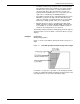
Figure 3-7. Use of a negative coordinate
LINE command
Specifying lines The LINE command specifies that one or more lines are to be drawn
in the same direction. A LINE command defines the following:
• Point at which the line begins (the AT location)
• Direction of the line (HORIZONTAL or VERTICAL)
• Length of the line (FROM location TO location)
• Type of line (SOLID, BROKEN, DOTTED)
• Thickness of the line (HAIRLINE, 0, 1, or 2)
• Number of times the same line is to be drawn, either from
different origins or at specified intervals from the initial origin.
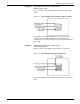
Use the following command format to specify lines:
c
o
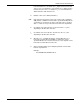
Number representing the displacement from the form origin of the
first or only point of origin, expressed in grid units or linear units. The
remainder of the line command specifies the length and
characteristics of a line to be drawn at this location.