
User guide





FORMS DESCRIPTION LANGUAGE
3-14 XEROX DOCUPRINT 180 LPS FORMS CREATION GUIDE
Example 6 LANDSCAPE PAGE SIZE IS 3 INCH 3 INCH;
GRID [UNIT] [IS] FMT1 ORIGIN 1 INCH 1 INCH;
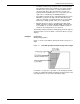
Figure 3-6 shows a form with the grid, origin, and page size specified.
Figure 3-6. Form with grid, origin, and page size specified
In example 6, the location of the virtual page origin is determined by
the PAGE SIZE command. The form origin is offset from the virtual
page origin by one inch vertically and one inch horizontally.
FONT command
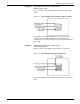
Specifying fonts The FONT command identifies the character sets to use when
creating and printing forms data and variable data. Fonts must be
selected using the FONT command before text can be specified.
FONT can be used only once. The command has the following
format:
FONT [S] id[. . . id];
id Identifier of the standard or custom font you want to use. The number
of fonts that can be specified depends on their size, the number of
fonts used in the variable data, and the size of font memory in your
system. However, the maximum number of fonts and logos allowed
per form by the forms compiler is 32.
Note: Multiple ids are separated by either a blank or comma.
Example:
FONTS UN106A,UN104C,UN114A;