
User guide






BASIC CONCEPTS
XEROX DOCUPRINT 180 LPS FORMS CREATION GUIDE 2-9
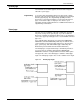
If you are measuring the grid in cpi and lpi units, the origin of the “A”
character cell is located two lines down and one character width to
the right of the form origin. At 10 cpi and 6 lpi, the “A” is .33 inch down
from the form origin and .10 inch to the right.
Negative coordinates Negative x and y values also may be used to place form elements
above and or to the left of the form origin, as long as the values are
within system page boundaries.
UNIT value The unit value of the GRID command specifies the unit of
measurement FDL commands use to position form elements on the
page. Optionally, you can select a predefined format that
automatically provides grid unit values. Individual FDL commands
may override GRID unit values.
Predefined formats
A set of predefined print description entries or formats, having
standard format specifications, are provided on the operating system
software (OSS) tapes. You may use these standard print formats or
define your own to suit your specific needs. These standard formats
provide commonly used impact printer conversion formats for use
with specific page sizes and orientations. Use the Xerox Design
Ruler to assist you in measuring character and line spacing. The ruler
has eight scales that conform to the standard format grid. (Refer to
table F-1.)
FMT1 (landscape) or FMT6 (portrait) is used by FDL to provide
default values for page orientation, form origin, and grid unit
dimensions, provided there are no explicit overriding parameters.
Note: Unless overridden by an explicit orientation PAGE SIZE
parameter, the virtual page size in a predefined format is always the
sysgen-specified paper size. The virtual page origin is located at the
upper left corner of the physical page.