
Product guide




USING THE PC UI
XEROX DOCUPRINT 180 LPS OPERATOR GUIDE 2-11
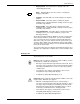
Disks icon. This icon allows you to access the Disks menu. A few
of the tasks you can perform through Disks windows are:
• Back up the system disk to tape
• Compress and verify the system disk file structure
• Reallocate print file and raster image file size
• Download communication and RIP software.
Utilities icon. This icon allows you to access the Utilities menu. A
few of the tasks you can perform through Utilities windows are:
• compile FDL (forms description language) or PDL (print
description language)
• Invoke file editor functions
• Transfer a single file from a Backup (DSR) tape to system disk
• Exit to DOS.
Notepad icon. This icon allows you to access the Notepad window
to view or create electronic notes for yourself or other PC UI users.