
Product guide




XEROX DOCUPRINT 180 LPS OPERATOR GUIDE 2-1
2. 2Using the PC UI
PC UI
With the PC UI you perform operator tasks through a dynamic set of
windows. Either a mouse or certain keyboard combinations are used
to move between windows and select options. The PC UI also allows
you to enter commands through a window on the display screen.
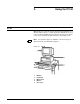
Note: Several PC UI types are available. Your PC UI may look
different from the one illustrated in figure 2-1.
Figure 2-1. PC UI
1 Monitor
2 Keyboard
3 Mouse pad
4 Mouse
5 Processor