
Product guide






MAINTENANCE TASKS
11-10 XEROX DOCUPRINT 180 LPS OPERATOR GUIDE
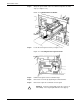
Step 11. Push the fuser drawer in until it latches in place (see figure 11-13).
Figure 11-13.Closing the fuser drawer
Step 12. Close the printer doors.
Note: The fuser agent message disappears after the LPS prints
between 32 and 40 sheets. Since the sheets must be processed
continuously, you may want to run 45 test pages in order to clear the
message from the system (unless the current print job contains at
least 40 pages).
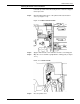
Cleaning the sensors and the reflecting surfaces
This section lists the steps to clean the following:
• Q850 sensor
• Q1011 sensor and mirror
• Q1106 sensor
• Q1166 sensor
• Q1107 sensor
• Q1164 sensor.