
Product guide






MAINTENANCE TASKS
XEROX DOCUPRINT 180 LPS OPERATOR GUIDE 11-7
Adding fuser agent
!
Warning: Fuser agent contains silicone, which can cause irritation
upon contact with the eyes. Be sure to wash your hands with soap
and water after you finish this procedure.
To add fuser agent:
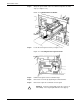
Step 1. Open the right and left doors of the printer and locate the fuser area
(see figure 11-9).
Figure 11-9. Fuser area
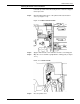
Step 2. Place a drop cloth on the floor under the fuser area.