
Product guide




STATUS AND PRINT TASKS
9-30 XEROX DOCUPRINT 180 LPS OPERATOR GUIDE
To set the maximum number of sheets for a bin:
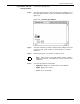
Step 1. Select the “Bin Limits” option from the header auxiliary menu of the
Bin Full Criteria window to open the Bin Limits window (see figure 9-
16).
Figure 9-16. Bin Limits window
Step 2. Enter the maximum number of sheets for the stacker bin(s).
Step 3. Select the appropriate header button:
• Apply/Close. Apply your selection and close the window.
• Apply. Apply your selection.
• Close. Close the window.
Bin Full Criteria and Setting Bin Limits
task through command line
To set the maximum number of reams for the bin, enter the following
command:
BINFULL [
threshold, boundary
]
Table 9-9 lists each parameter and its description.
To specify the maximum number of sheets for the bin, enter the
following command:
Table 9-9. BINFULL command parameters and descriptions
Parameter Description
threshold
The maximum number of reams for the bin. This
number must be between 0 and 5.
Note: If the threshold is 0, the boundary must be
specified.
boundary
The separation boundary for the bin. The
options are:
• NONE. There is no separation boundary.
• SET. The stacking switches after each
printed set.
• REPORT. The stacking switches after each
printed report.
• JOB. The stacking switches after each
printed job.