
Product guide




STATUS AND PRINT TASKS
XEROX DOCUPRINT 180 LPS OPERATOR GUIDE 9-29
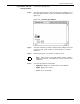
Note: If you select a button other than Max, the Boundary
fields appear (see figure 9-15).
Figure 9-15. Bin Full Criteria window, containing Boundary
options
The Boundary fields allow you to define the point at which stacking
switches to the other bin.
Note: If the threshold you select is 0 reams, you must select a
boundary. Otherwise, boundary selection is optional.
Step 3. To set a separation boundary, select the Boundary box and one of
the following buttons:
• Set. The stacking switches after each printed set.
• Report. The stacking switches after each printed report.
• Job. The stacking switches after each printed job.
Step 4. Select the appropriate header button:
• Apply/Close. Apply your selection and close the window.
• Apply. Apply your selection.
• Close. Close the window.