
Product guide




STATUS AND PRINT TASKS
9-28 XEROX DOCUPRINT 180 LPS OPERATOR GUIDE
Set Container Size task through
command line
Enter the following command:
SET CONTAINER
container #,w,l
Table 9-8 lists each parameter and its description.
Note: You cannot enter inches in command line mode.
Bin full criteria and setting bin limits
You can request that bins continue to fill until:
• A specific number of reams or sheets has been stacked
• A specific report, report set, or print job is finished
• A specific report, report set, or print job is finished after a
specific number of sheets has been stacked.
Bin Full Criteria and Setting Bin Limits
task through windows
To set the maximum number of reams for a bin:
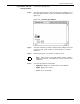
Step 1. Select the “Bin Full Criteria” option from the header auxiliary menu of
the Printer Status window to open the Bin Full Criteria window (see
figure 9-14).
Figure 9-14. Bin Full Criteria window
Step 2. Select the number of reams for the bins.
Table 9-8. SET CONTAINER command parameters and
descriptions
Parameter Description
container #
The container you want to modify.
w
The new width in millimeters.
l
The new length in millimeters.