
Product guide





STATUS AND PRINT TASKS
9-14 XEROX DOCUPRINT 180 LPS OPERATOR GUIDE
Clusters
Use the Clusters task to:
• Display all the clusters in the system with their preferred and
current trays
• Define new clusters
• Edit preferred or current trays for existing clusters.
Note: You must define tray contents to the LPS when you
change the stock in a tray being used by the current stockset
without being prompted by the system to change the stock in
that tray.
Clusters task through windows Perform the following steps:
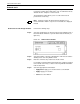
Step 1. Select the Clusters header button from the Printer Status window to
open the Clusters window.
Note: You can also access the Clusters window by selecting
the Clusters header button from the Tray Loading confirmation
window.
Figure 9-7. Clusters window