
Product guide




OFFLINE PRINTING TASKS
XEROX DOCUPRINT 180 LPS OPERATOR GUIDE 7-9
Unload an open-reel tape
Before unloading a tape, ensure that the LPS system is not
accessing the open-reel tape drive, to avoid loss of data. The tape
drive should be offline and the message display should read “Ready”
before you remove a tape.
Note: You can also rewind and/or unload a tape using the PC UI or
system controller terminal. For instructions, refer to the “Rewind/
unload tape” section later in this chapter.
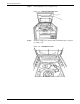
Place the tape drive offline To take the open-reel tape drive offline, press the Reset button, or the
Diag button if you are in Diagnostic mode (see figure 7-12).
Figure 7-12. Reset and Diag buttons
To unload a tape from the 9-track magnetic tape drive:
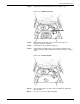
Step 1. When “Offline” appears on the message display, press and hold
the Reset button and the Rwd/Unl button (see figure 7-13).
Figure 7-13. Reset and Rwd/Unl buttons