
Product guide




JOB CONTROL TASKS
5-14 XEROX DOCUPRINT 180 LPS OPERATOR GUIDE
Fonts/Forms/Graphics task
through windows
Perform the following steps:
Step 1. Select "Fonts/Forms/Graphics" from the Job Control menu to open
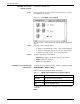
the Fonts/Forms/Graphics window (see figure 5-9).
Figure 5-9. Fonts/Forms/Graphics window
The current numbers for fonts, forms, and graphics are displayed.
Step 2. Change whatever values you want by entering a new number in the
appropriate field. For example, to change the number of forms, place
the cursor over the number, press the <DELETE> key, and then
enter the new number.
Step 3. Select either:
• Apply/Close. Apply your selection and close the window.
• Apply. Apply your selection.
• Close. Close the window.
Fonts/Forms/Graphics task
through command line
To set the maximum number of files, enter the following command:
{FONTS|FORMS|GRAPHIC}
number
Table 5-4 lists the parameter and its description.
To display the current number of fonts, enter the following command:
FONTS
To display the current number of forms, enter the following
command:
FORMS
To display the current number of graphics, enter the following
command:
GRAPHIC
Table 5-4. FONTS/FORMS/GRAPHIC command parameter
and description
Parameter Description
number
The maximum number per print job.