
Product guide




JOB CONTROL TASKS
5-12 XEROX DOCUPRINT 180 LPS OPERATOR GUIDE
Lead Edge Screen task
through windows
Perform the following steps:
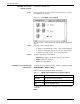
Step 1. Select “Lead Edge Screen” from the Job Control menu to open the
Lead Edge Screen window.
Figure 5-8. Lead Edge Screen window
The current value of edge lightening is indicated by the highlighted
button.
Step 2. Select one of the following options:
• To apply a normal lead edge screen, select the Normal button.
• To apply a heavier lead edge screen, select the Stress button.
• To turn the lead edge screen off, select the Off button.
Step 3. Select the appropriate header button:
• Apply/Close. Apply your selection and close the window.
• Apply. Apply your selection.
• Close. Close the window.
Lead Edge Screen task through
command line
To change the edge lightening value, enter the following command:
EDGE [NORMAL|STRESS|OFF]
Table 5-3 lists each parameter and its description.
To display the current value of edge lightening, enter the following
command:
EDGE
Table 5-3. EDGE command parameters and descriptions
Parameter Description
NORMAL Apply normal edge lightening.
STRESS Apply heavier edge lightening.
OFF Turn off edge lightening.