
User guide



DISK WINDOWS
XEROX DOCUPRINT 180 LPS PC UI REFERNCE 4-5
Download Controller (PSC)
Use this window to download files to the CSI, a printed wire board in
the system controller which interfaces with the printer.
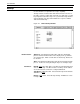
Figure 4-5. Disks>Download Controller (PSC) window
Parameters CLI: Select this option to retry client layer initialization to the printer.
CSI: Selecting this option downloads the software for printer and
system controller communication, which is also downloaded by a
system boot.
SCSI: Selecting this option downloads the SCSI file, SCSIOS.SYS.
Note: The printer must be idle to run the PSC task.
A minimum logon level of 2 is required to use this task. Access to
PSC can be restricted by the RCU (restrict command usage) window.