
User guide



DISK WINDOWS
XEROX DOCUPRINT 180 LPS PC UI REFERNCE 4-3
Compress
Use this task to verify the integrity of the system’s file structure, as
well as to perform file and directory compression.
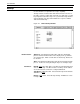
Figure 4-3. Disks>Compress window
Parameters Compress
: Creates an ordered list of files by their location on the
disk, removes any non-movable files from the list, and attempts to fill
each free area on the disk with a file of the same size.
Verify: Verifies the integrity of the system’s file structure.
Disk ID: DP0
, DP1, DP2, DP3. Select/Deselect the disks that are to
be backed up. The DP0 check box is always shown. Others are
shown only if the controller is configured with them.
Note: If the Compress procedure encounters multi-allocated
sectors, the compression process is terminated and a disk compress
error report file is created. A message is displayed asking you if you
want to print the disk compress error report. If you want the error
report printed, selecting Yes will send the appropriate Start
command. The disk compress error report contains:
Date and time
File in error Unit
Start logical block number
Size