
User guide





FILES WINDOWS
XEROX DOCUPRINT 180 LPS PC UI REFERENCE 3-5
Copy
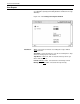
Use this window to copy files residing on the system disk (disk to
disk).
Figure 3-4. Files>Copy window
Parameters From Disk ID: Default
, DP0, DP1, DP2, DP3. Select/enter the disk
number that contains the file to be copied.
Input File ID: Specify the file to be copied. Use the form “file-
name.file-type”.
To Disk ID: Default
, DP0, DP1, DP2, DP3. Select/enter the disk
number that the file is to be copied to.
Output File ID: Specify the “file-name.file-type” that the input file
should be copied to. If the output file-type is not specified, the file-
type will be the same as the input file.