
User guide






FILES WINDOWS
3-4 XEROX DOCUPRINT 180 LPS PC UI REFERENCE
Note: Masking is allowed. Masking eliminates the need to
repeatedly key-in file names that contain the same characters. An
asterisk (*) is all inclusive. A question mark (?) is positional. Refer
to the“File ID and masking” section of the Introduction to this
document.
Type
To be displayed, the selected file ID must be a non-compiled source
file.
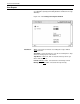
Figure 3-3. Files>Type window
Header buttons Paged Display...: Select this header button to view the file listing
page by page in the Commmand Line/Message window. Press the
<ENTER> key to page through the listing.
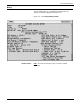
Display: Selecting the Display header button or pressing <ENTER>
displays the text file you have specified. Press <CTRL><X> to
cancel the file listing in the Display window.
Parameters Disk ID: Default, DP0, DP1, DP2, DP3. Select/enter the disk
number where the text file is located.
File ID: Enter the file identifier in the form “file-name.file-type”.