
User guide






FILES WINDOWS
XEROX DOCUPRINT 180 LPS PC UI REFERENCE 3-3
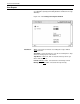
Disk File ID: Enter the name of the file to be read. The ID can be a
maximum of 10 characters (6 characters for File Name,1 character
for decimal separator, and 3 characters for File Type).
Floppy File ID: Enter the name of the floppy diskette file and
directory that you want displayed. The form is filename.file-type (for
example, UNIVAC.JSL).
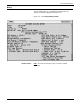
Extended Display/Print: Extended Display/Print information for
files on disk includes the following:
Information for files on tape includes the following:
The total number of files displayed/printed and the total number of
disk sectors used by these files is also listed. Each output page
contains a header line that includes the page number, the date and
time, and the tape volume-id, if applicable.
Extended file information is not displayed for licensed fonts or
secured files. Extended Display, Extended Print and Sort File ID are
not available when specifying string comments. Extended Display
and Extended Print are not available when TD0, TD1, or TD2 is the
selected device.
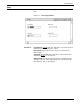
Sort File ID: Enter a Sort File ID to create a file that contains an
alphabetical sorting of the specified files. If no Sort File ID is entered,
the specified files are displayed/printed sequentially.
String File ID/String Comments: Entering a String File ID and
String Comments specifies that a file is to be created that contains
the specified file IDs with leading and/or trailing comments (generally
used for building command files). String Comments are limited to 50
characters total. Leading and trailing comments must be separated
by a comma. Any characters may be used in the String Comments,
except for the comma (,), since it is used as a separator.
When specifying string comments, Extended Display, Extended
Print, and Sort File ID are not available.
File ID file-name and file-type
Disk Unit disk number on which file is located
File Size number of blocks allocated to the file
Record Size number of bytes a record contains
First Free Byte first free byte in the block of a file
End of File end of file block number
Disk Address starting address of the file on the disk
File Number numerical position of a file on the tape
File Name identifier for file
File Size number of 512 byte disk sectors
Blocking Factor (BF) number of 512 disk sectors contained in 1
tape block
Date date the file was written to tape