
User guide






ACCOUNTING WINDOWS
2-12 XEROX DOCUPRINT 180 LPS PC UI REFERENCE
Save Reports
The Save Reports window allows you to save to tape and clear the
accounting files (both System Activity Statistics and Customer Usage
Statistics).
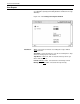
Figure 2-10. Accounting>Save Reports window
Parameters Save
: Select Save to write the accounting files to tape without
clearing the files.
Save/Clear: Select Save/Clear to save the accounting files to tape
and clear existing reports from the files.
Tape Device: TD0
, TD1, TD2. Select/enter the tape device you
wish to write the files to.
Format: EBCDIC
, ASCII. Select/enter the desired tape format.
Density (BPI): 1600
, 6250. Select/enter the tape density.