
User guide






ACCOUNTING WINDOWS
XEROX DOCUPRINT 180 LPS PC UI REFERENCE 2-11
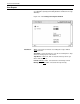
Add, Delete: The Add and Delete header buttons allow you to add
to and delete from the list of department names. Note that a
department name cannot be deleted if data for that department exists
in the accounting file.
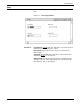
Parameters Department: Entering a department/JDL name in the Department
field allows you to delete or add that department/JDL name. Note
that a department name cannot be deleted if data for that department
exists in the accounting file.
Selecting a name from the existing list of department/JDL names
allows you either to print or delete that name from the list.
Note: User report log statistics cannot be displayed on the UI.
There are two OSS-supplied department/JDL entries under which
accounting data is accumulated. “NODEPT” is the name under
which statistics are accumulated for print jobs without name entries
in the accounting file. TASKS$.JDL is a name under which
accounting information is accumulated for printing done by system
tasks such as FDL, PDL, and the Editor.