
User guide







ACCOUNTING WINDOWS
2-10 XEROX DOCUPRINT 180 LPS PC UI REFERENCE
For information on saving statistics to tape, refer to the Save Reports
task figure 2-10 in this section.
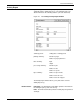
User Report
System usage data for all print jobs on a departmental/JDL basis are
accumulated and summarized in the User Report log. The log is
dated and includes the following statistics (since the last Clear) for
each department/JDL that has been previously entered into your
site’s accounting file. This information cannot be viewed on the PC
UI; it must be printed for viewing
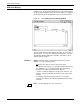
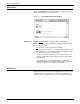
Figure 2-9. Accounting>User Report window
Header buttons Print All: This header button prints the entire User Report log
without clearing it. Log entries for a specific department/JDL cannot
be printed.
department/JDL
printing summary: number of pages
number of lines
number of pages sent to sample tray
number of pages sent to purge tray
time summary: input (hours, minutes)
output (hours, minutes)
number of jobs
number of files
number of reports
processing summary:
tape summary: number of tape mounts
number of blocks read
number of blocks skipped