
User guide







ACCOUNTING WINDOWS
XEROX DOCUPRINT 180 LPS PC UI REFERENCE 2-9
Activity Report
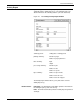
System usage data for all completed print jobs are accumulated and
summarized in the Activity Report log. The Activity Report log is
dated and includes the following statistics (since the last Clear):
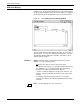
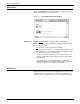
Figure 2-8. Accounting>Activity Report window
The Activity Report window allows you to print and/or clear the
Activity Report log.
Header buttons Print/Clear: The Print/Clear header button prints the information in
the Activity Report log and clears the log.
Print: The Print header button prints the Activity Report log without
clearing it.
summary period: ending date of activity period
printing summary: number of pages
number of paper path holes
time summary: input
output
processing summary: number of jobs
number of files
number of reports
tape summary: number of tape mounts
number of blocks read
number of blocks skipped