
User guide








ACCOUNTING WINDOWS
2-8 XEROX DOCUPRINT 180 LPS PC UI REFERENCE
SFS Format
Use this window to format the status file for the host and write it to
disk as SFASEB.MSC. The status file must be formatted before it
can be transmitted to the host by modem.
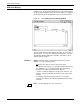
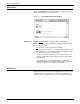
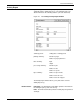
Figure 2-7. Accounting>SFS Format window
Parameters Format: ASCII
, EBCDIC. Select/enter the desired format.
Entries: Enter the range of SFS report entries you want formatted.
Use the following options:
All
formats the entire list of SFS report entries.
n
formats the first n reports. For example, typing 5 and pressing
the <ENTER> key (or selecting the Apply header button) formats
the first five report entries in the SFS list.
-m
(dash, a number) formats the last m reports in the list. For
example, entering -5 (dash 5) formats the last five report entries
in the SFS list.
n-m
formats reports n through m inclusive. For example,
entering 10-15 formats the tenth through fifteenth report entries
in the list. Separate sets of entries are accepted.
SFS Search
SFS Search, selected from the Accounting window, searches for an
existing status file. If no status file is found, you are prompted to
create a new one using SFS Create. There is no window for this task.