
User guide







ACCOUNTING WINDOWS
XEROX DOCUPRINT 180 LPS PC UI REFERENCE 2-7
SFS Clear/Create
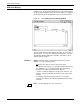
Use this window to clear the contents of the status file or to create a
new status file of a different size. The status file can also be created
at sysgen.
Figure 2-6. Accounting>SFS Clear/Create window
Parameters Clear/Create: Select Clear to clear the status file. Select Create to
create a new status file.
Size (Blocks): 667
, 34. The Size parameter is available for the
Create option only. Select/enter the desired size in blocks of the new
status file. The last value entered becomes the default.
Warning/Frequency Flags: The warning flag indicates that the
logical end of the status file is approaching. The default for the
warning flag is 40, meaning a warning flag is displayed when there
are only 40 entries available in the status file. The last number
entered becomes the default.
Frequency flags determine how many times warning flags are
displayed. The default number of frequency flags is 3, meaning a
warning flag is displayed three times to notify you that the status file
is nearly full.