
User guide







ACCOUNTING WINDOWS
2-6 XEROX DOCUPRINT 180 LPS PC UI REFERENCE
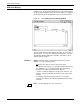
SFS Save
This window saves the contents of the status file to magnetic tape.
The status file can also be saved to tape from the File Management
Copy window.
Figure 2-5. Accounting>SFS Save window
Parameters Tape Device: TD0
, TD1, TD2. Select/enter the tape device you
want to copy the status file to.
Format: ASCII
, EBCDIC. Select/enter the tape format
Blocks: 80, 256
, 512. Select/enter the block count.
Density: 1600
, 6250. Select/enter the tape density.
Entries: Enter the range of report entries you want saved to tape.
Use the following options:
All
saves the entire list of SFS report entries.
n
saves the first n reports. For example, typing 5 and pressing
the <ENTER> key (or selecting the Apply header button) saves
the first five report entries in the SFS list.
-m
(dash, a number) saves the last m reports in the list. For
example, entering -5 (dash 5) saves the last five report entries in
the SFS list.
n-m
saves reports n through m inclusive. For example, entering
10-15 saves the tenth through fifteenth report entries in the list.
Separate sets of entries cannot be saved.