
User guide







ACCOUNTING WINDOWS
XEROX DOCUPRINT 180 LPS PC UI REFERENCE 2-5
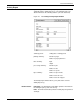
All prints the entire list of SFS report entries.
n
prints the first n reports. For example, typing 5 and pressing
the <ENTER> key (or selecting the Apply header button) prints
the first five report entries in the SFS list.
-m
(dash, a number) prints the last m reports in the list. For
example, entering -5 (dash 5) prints the last five report entries in
the SFS list.
n-m
prints reports n through m inclusive. For example, entering
10-15 prints the tenth through fifteenth report entries in the list.
Destination: Select either Bin
or Sample Tray to indicate where you
want the SFS printout sent. If the Test header button is selected, the
default destination is the sample tray.