
User guide



USING THE PC UI
1-22 XEROX DOCUPRINT 180 LPS PC UI REFERENCE
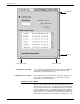
Scrolling text to the right To scroll text to the right, follow the above procedure, but place the
cursor on the arrow left target area. A single click moves the
information one character to the right.
Scrolling the text to the left To scroll text to the left, follow the above procedure, but place the
cursor on the arrow right target area. A single click moves the
information one character to the left.
Activating an open window
Only one window can be active at a time, although more than one
window can be open at a time. To activate an open window, move
the cursor into the work area of the window and click once with the
left mouse button or press the <ESCAPE> key, then the <ENTER>
key. The header area of the window is now highlighted, and you can
select options or enter commands in the window. If the window was
underneath another window on the desktop, it now appears on top.
Scroll down
Scroll up
Scroll to the right Scroll to the left