
User guide



USING THE PC UI
XEROX DOCUPRINT 180 LPS PC UI REFERENCE 1-19
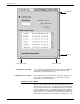
Moving and resizing the window
The Move/Resize targets allow you to move and/or resize a window
on the PC UI.
Moving the windows To move the window to a new position on the desktop:
1. Place the cursor over the Move/Resize target.
2. Press the left mouse button and hold it down while you “drag”
the window to its new position.
3. Release the left mouse button.
To move the window using only the keyboard:
1. If necessary, press the <ESCAPE> key to remove the data
entry cursor from the window.
2. Position the main cursor arrow over the Move/Resize target.
3. Press and hold the <ENTER> key while using the appropriate
arrow keys to move the window.
Figure 1-17. Moving a window