
User guide



USING THE PC UI
XEROX DOCUPRINT 180 LPS PC UI REFERENCE 1-15
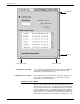
Buttons and check boxes Buttons and check boxes are used to select options in a window.
They can be on or off (selected or not selected). When a button is
on, a dot fills the center of the circle. When a check box is on, an X
fills the middle of the box. Refer to figure 1-11 for a display of buttons
and check boxes that are on and off.
Figure 1-10. Window example of button and checkbox
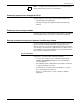
Figure 1-11. Buttons and check boxes
To select a button or check box, click on it using either the mouse or
the keyboard (refer to the “PC UI mouse” and “PC UI keyboard”
sections of this chapter). Only one button can be selected from a set
of buttons; multiple check boxes may be selected in a set of check
boxes.