
User guide





XEROX DOCUPRINT 180 LPS PC UI REFERENCE 9-1
9. 9Notepad window
The Notepad window allows you to create notes for yourself or for
other users on the PC UI.
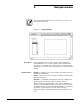
Figure 9-1. Notepad window
Description Select the Notepad icon from the PC UI desktop to display the
Notepad window. You can create, display, edit, and delete notes.
The names of all existing notes on the system are displayed in the
Saved Note list. The list of notes is updated as notes are created and
deleted.
Header buttons Display: To display a note, enter/select the saved name and select
the Display header button.
Delete: To delete a note, enter/select the saved name and select the
Delete header button.
New Note: Selecting this header button clears any existing text in
the input field so that new text can be entered and saved.
Save: Selecting this header button or pressing the <ENTER> key
saves the note text under the name you specify. (Note text can be
up to 256 characters.) A confirmation window displays to confirm that
you want to save the changes you have made to the note.
Saving a note with a currently existing name will overwrite the old
note.